
AlphaCode roll labels
Alphabetic colour blocks keyed to the first letters of a surname. The classic choice for personnel, patient and client files.
Quickly identify and manage paper documents with a proven sequence of file folders with color-coded labels — a system that reduces retrieval time by up to 40 percent.
The bottleneck in most file rooms is not storage, it is searching. Color coding converts a linear search — reading tab after tab — into a visual one. Your eye goes straight to the block of colour that matches the file you want.
The second benefit is error detection. In a properly colour-coded sequence, a misfiled folder breaks the pattern and is obvious from across the room. That is how misfile rates fall and how lost charts get noticed before an audit does.
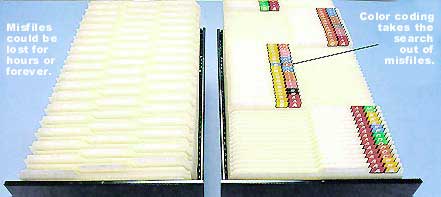
Alphabetic colour blocks keyed to the first letters of a surname. The classic choice for personnel, patient and client files.
Straight-numeric or terminal-digit sequences for high-volume numeric filing, where the last two digits position the file.
A complete pre-printed colour-coding pack for a defined name range — the fastest route to a new colour-coded system.
Print colour-coded labels on site from your own data, with an applicator that finishes folders ten times faster than hand-wrapping.
FileTracker integrates with TABQuik so the label and the tracking record are produced from the same data.
Year labels for the first thing staff read, plus printed index strips built to your classification scheme.
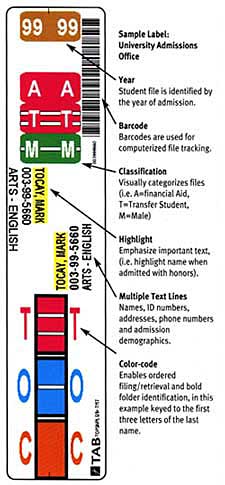
A well-designed label carries more than a name. Depending on your system it can include:
Instead of reading folder tabs one at a time, staff look for a colour block. In an alphabetic system the first letters of the surname are coded in colour, so the eye finds the right section of the drawer immediately. In numeric systems the last two digits are colour-coded so the file sits in a predictable position.
AlphaCode is an alphabetic colour-coding label system keyed to the first letters of a name. CompuColor is a complete pre-printed colour-coding pack for a defined name range, which is the fastest way to start a new colour-coded system from scratch.
You need folders that accept the label format you choose — typically end-tab or top-tab folders, classification folders, file pockets or pressboard folders. We supply all of them, in the colours your sequence uses. See filing supplies.
That is exactly the problem TABQuik solves. It prints colour-coded labels on demand from your database, barcode data or keyboard input, so new files match the existing sequence without waiting for a pre-printed supply. See TABQuik.
Yes, indirectly but significantly. A missing folder is visible because the colour sequence is broken, so losses are detected early rather than discovered during an audit. That matters for patient charts and client files.
Toll free 800-396-0738
Local 252-355-6948
Fax 252-355-6953
sales@systems-sales.com
Ask for Bill Lehman for product and project enquiries.
2780 Dickinson Avenue
Greenville, NC 27834
Directions & contact form
Talk to a records management consultant about your filing, storage and compliance requirements. No obligation, no pressure.