
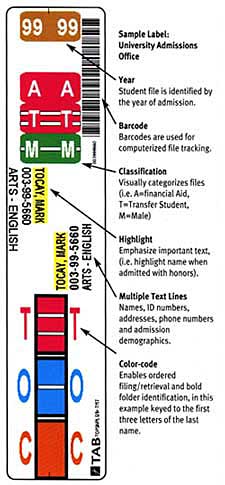
Bar code
Barcodes are used for computerised file tracking, linking the physical folder to a record in FileTracker or your own system.
No obligation, 30 day free trial — TABQuik on-site, on-demand, label printing.
When the time required to hand-wrap individual labels for new files causes you to fall behind, creating an information “black hole”, the answer is TABQuik.
TABQuik creates color-coded files from existing database information, barcode data or keyboard input. The printer delivers uniform, adhesive labels in your format, and the exclusive TABQuik applicator (pat. pend.) produces perfectly finished folders at ten times the speed of hand-wrapping individual labels.
High-volume, daily updating is fast and easy with TABQuik — the unique applicator is the heart of the system.
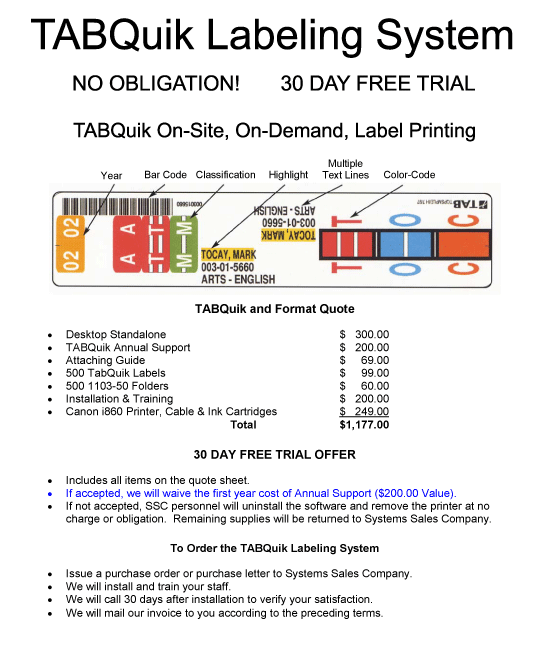
Barcodes are used for computerised file tracking, linking the physical folder to a record in FileTracker or your own system.
Identifies the year of admission, enrolment or file creation — the first thing most staff read.
Visually categorises files (for example A = Financial Aid, T = Transfer Student, M = Male).
Emphasises important text, such as highlighting the name when a student is admitted with honours.
Names, ID numbers, addresses, phone numbers and any other demographic information you need.
Enables ordered filing and retrieval and bold folder identification, typically keyed to the first letters of a surname.
The printer delivers uniform adhesive labels in your configured format. The applicator then wraps the label around the folder in a single motion, so the finished product is square, consistent and legible — every time.
Because labels are produced on demand from live data, you never run out and you never throw away pre-printed stock when a numbering scheme changes.
TABQuik is an on-site, on-demand label printing system for color-coded file folders. It creates color-coded labels from existing database information, barcode data or keyboard input, and its applicator produces finished folders far faster than hand-wrapping individual labels.
Yes — TABQuik is available with a 30 day free trial, no obligation. If accepted, we waive the first year cost of Annual Support ($200.00 value).
If not accepted, SSC personnel will uninstall the software and remove the printer at no charge or obligation. Remaining supplies will be returned to Systems Sales Company.
Issue a purchase order or purchase letter to Systems Sales Company. We will install and train your staff, will call 30 days after installation to verify your satisfaction, and will mail our invoice to you according to the preceding terms.
Toll free 800-396-0738
Local 252-355-6948
Fax 252-355-6953
sales@systems-sales.com
Ask for Bill Lehman for product and project enquiries.
2780 Dickinson Avenue
Greenville, NC 27834
Directions & contact form
Talk to a records management consultant about your filing, storage and compliance requirements. No obligation, no pressure.